
How to Accept Bitcoin Payments on WooCommerce (2026 Guide)
 Ricky
Ricky

You can accept Bitcoin payments on your WooCommerce store by installing a non-custodial crypto payment plugin like Aurpay. Setup takes about 15 minutes, requires no KYC verification, and sends BTC directly to your own wallet at a 0.8% processing fee — roughly a third of what credit card processors charge.
Bitcoin remains the most recognized cryptocurrency in the world. Over 200 million people hold BTC globally as of early 2026, and merchant adoption continues to accelerate as network fees drop and Layer 2 solutions mature. For WooCommerce store owners, accepting Bitcoin opens your store to a global customer base that prefers peer-to-peer payments over traditional card networks. This guide covers why BTC matters for your store, how to set it up on WooCommerce, and how to manage the practical challenges of accepting a volatile asset.
Why Accept Bitcoin on Your WooCommerce Store
The Largest Crypto Customer Base
Bitcoin commands roughly 55% of the total cryptocurrency market cap in Q1 2026. More importantly for merchants, BTC holders span every demographic and geography. Unlike altcoins that attract primarily DeFi users or developers, Bitcoin’s user base includes retail investors, long-term savers, and everyday spenders. When you accept BTC, you tap into the broadest possible crypto audience.
Many of these holders actively look for places to spend Bitcoin. The rise of Bitcoin ETFs in 2024 and 2025 brought millions of new holders who view BTC as a spending currency, not just an investment. A WooCommerce store that accepts Bitcoin removes friction for these buyers — instead of converting to fiat and then paying with a card, they pay directly from their wallet.
Lower Fees Than Card Processors
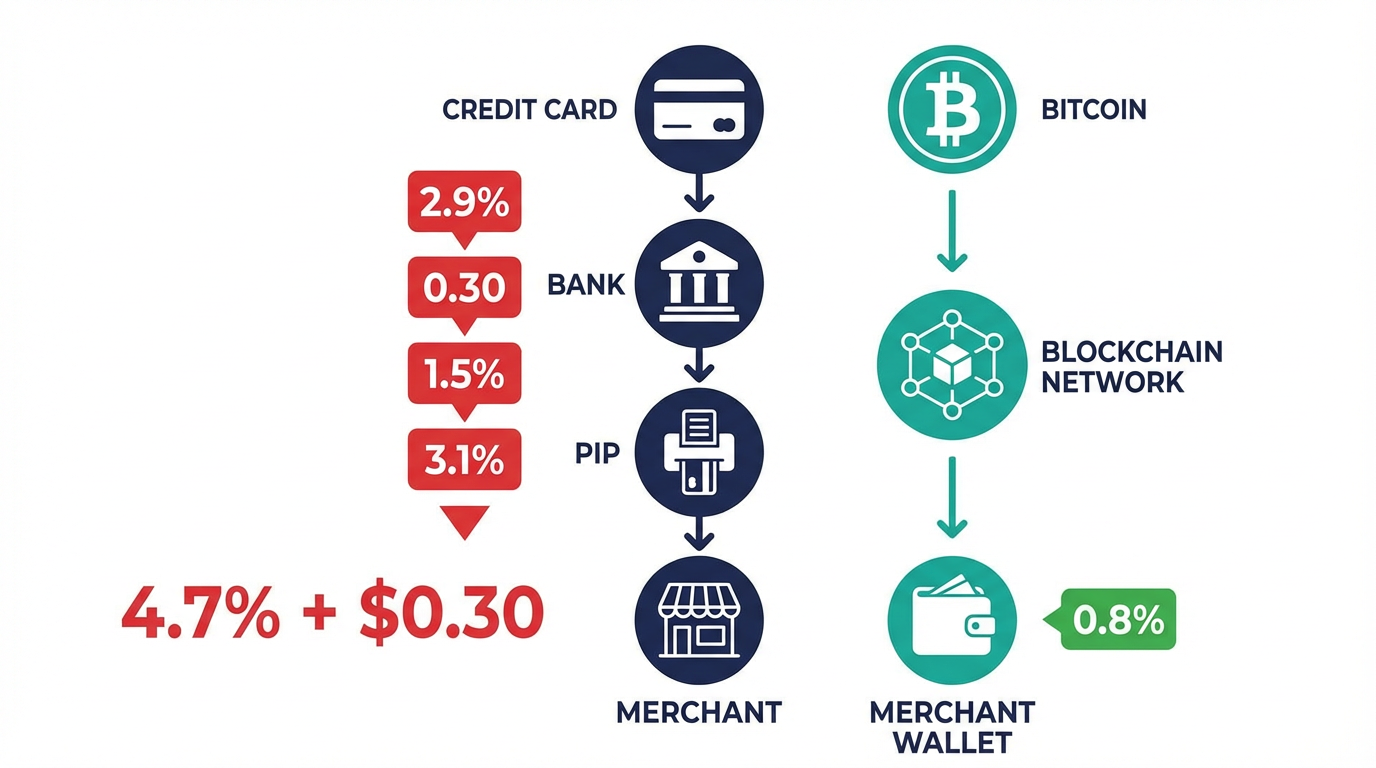
WooCommerce merchants using Stripe or PayPal typically pay 2.9% plus $0.30 per transaction. For a store processing $15,000 monthly, that adds up to roughly $480 in fees. A non-custodial Bitcoin payment gateway like Aurpay charges 0.8% with no per-transaction fixed fee — bringing that same volume down to $120. Over a year, you save over $4,300.
The savings increase for international orders. Cross-border credit card transactions often carry an additional 1% to 1.5% foreign transaction fee charged by the card network. Bitcoin transactions cost the same whether your customer is across the street or across the ocean. If your WooCommerce store ships internationally or sells digital products to a global audience, BTC payments eliminate these surcharges entirely.
Zero Chargebacks
Chargebacks cost WooCommerce merchants more than the refund itself. Each disputed transaction carries a $15 to $25 chargeback fee from the payment processor, regardless of whether you win the dispute. For stores selling digital products, downloadable content, or services — where proving delivery is difficult — chargeback rates can exceed 1% of revenue.
Bitcoin transactions are irreversible once confirmed on the blockchain. There is no mechanism for a buyer to initiate a payment reversal after the network confirms the transaction. This eliminates friendly fraud, which accounts for an estimated 70% of all chargebacks according to industry data. You still handle legitimate refunds through your store’s return policy, but the decision stays with you, not a payment processor’s dispute team.
Understanding Bitcoin Network Fees
Before you start accepting BTC, you need to understand how network fees work. Unlike credit card fees that come as a percentage of the sale, Bitcoin fees are based on transaction size in bytes and current network demand — not the payment amount.
Current Fee Landscape
In early 2026, a standard Bitcoin transaction costs between $0.50 and $3.00 during normal network activity. During high-demand periods — such as mempool congestion from large-scale trading activity or new protocol launches — fees can spike to $10 or more. The key point for merchants: the customer typically pays the network fee when sending BTC, so your cost remains the gateway’s processing fee (0.8% with Aurpay).
For practical purposes, Bitcoin on-chain payments work best for orders above $25 to $50, where the network fee represents a small fraction of the total. For smaller purchases, you may want to offer stablecoins like USDT or USDC as alternatives, since their network fees on chains like Tron (TRC-20) or Polygon stay below $0.01.
Fee Estimation and Confirmation Times
Bitcoin transactions require confirmations from the network before they are considered final. A single confirmation typically takes about 10 minutes, though this varies based on block timing. Most payment gateways, including Aurpay, consider a transaction confirmed after one or two confirmations, depending on the order amount.
For e-commerce, this means there is a brief waiting period between when a customer sends BTC and when your system marks the order as paid. In practice, the payment gateway detects the unconfirmed transaction within seconds and shows the customer a “payment detected” status. The order processing can begin immediately for digital products or be held until confirmation for physical goods — this is configurable in your WooCommerce payment settings.
Step-by-Step: Set Up Bitcoin Payments on WooCommerce
Prerequisites
Before starting, make sure you have:
- A WooCommerce store running WordPress 5.8 or higher
- WooCommerce 6.0 or higher installed and configured
- A Bitcoin wallet address (any standard BTC wallet works — hardware wallets like Ledger or Trezor, software wallets like Electrum, or exchange deposit addresses)
- Admin access to your WordPress dashboard
Step 1: Install the Aurpay Plugin
Navigate to Plugins → Add New in your WordPress admin panel. Search for “Aurpay” in the plugin directory. Click Install Now, then Activate. The plugin adds a new payment method to your WooCommerce checkout without requiring any theme modifications or custom code.
Step 2: Connect Your Bitcoin Wallet
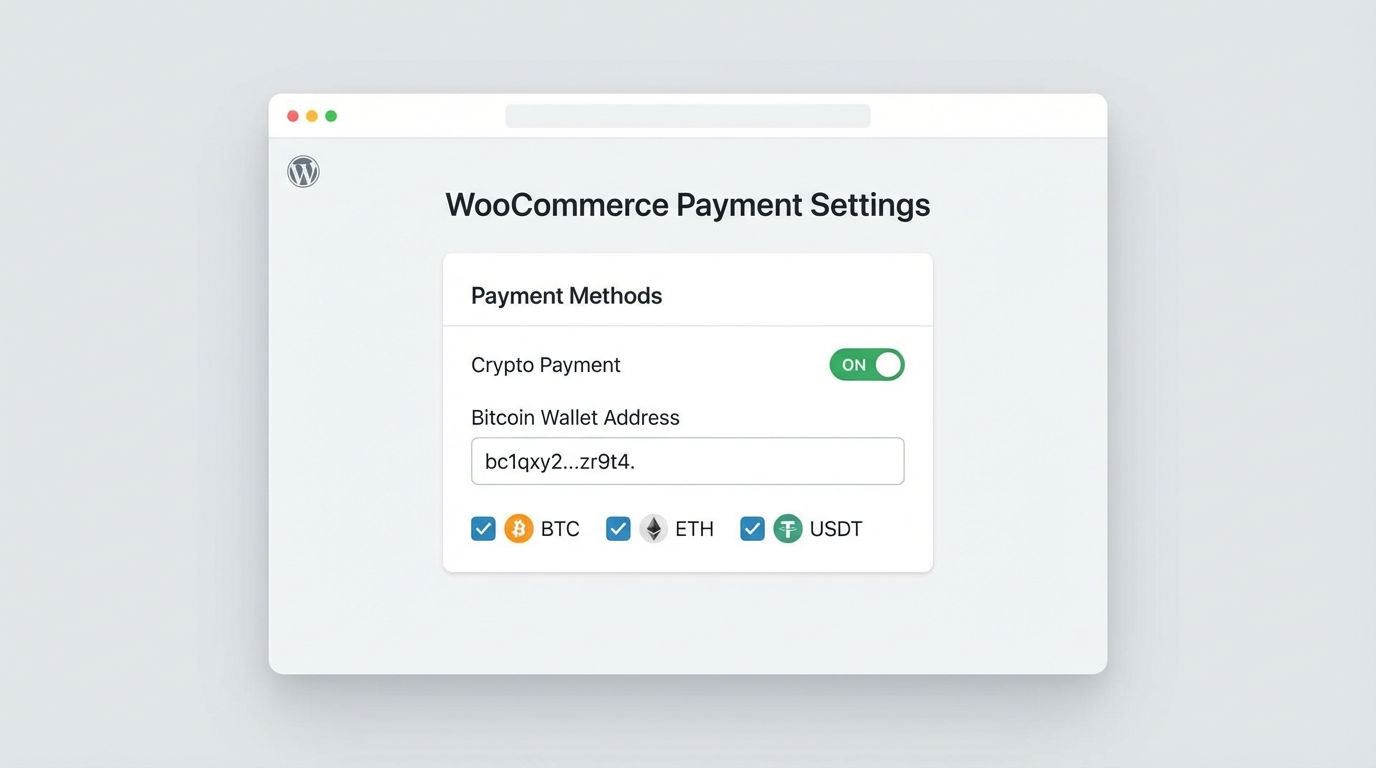
Go to WooCommerce → Settings → Payments and click Manage next to the Aurpay payment method. Enter your Bitcoin wallet address in the configuration panel. Because Aurpay operates on a non-custodial model, every BTC payment goes directly to this address. You maintain full control of your funds at all times — Aurpay never holds your Bitcoin.
Use a dedicated wallet address for your store rather than a personal wallet. This simplifies accounting and makes it easier to track business revenue separately from personal holdings.
Step 3: Configure Accepted Currencies and Networks
In the Aurpay settings, enable BTC as an accepted currency. You can also enable additional cryptocurrencies — USDT, USDC, ETH, BNB, DAI, and MATIC — to give customers more payment options. Each currency and network can be toggled independently, so you control exactly what your checkout offers.
Enabling multiple currencies alongside Bitcoin is recommended. Some customers prefer paying with stablecoins to avoid price volatility during the transaction. Offering both BTC and stablecoins captures the widest range of crypto-paying customers.
Step 4: Set Payment Confirmation Rules
Configure how many blockchain confirmations your store requires before marking an order as paid. For most WooCommerce stores, one confirmation provides a good balance between security and speed. High-value orders (above $500) may warrant two or three confirmations for additional security.
The plugin also lets you set a payment expiration window — the time a customer has to complete the BTC transfer after initiating checkout. A 15 to 30 minute window is standard, accounting for wallet loading times and potential network delays.
Step 5: Test the Integration
Place a test order on your store and select the crypto payment option at checkout. Verify that the payment page displays your correct wallet address and the accurate BTC amount based on the current exchange rate. Send a small test payment and confirm it arrives in your wallet. The entire setup process, from plugin installation to your first confirmed test payment, takes about 15 minutes.
What Your Customers See at Checkout
When a customer selects crypto payment at checkout, Aurpay generates a payment page showing the exact BTC amount owed (calculated from the current BTC/USD exchange rate), your wallet address, and a QR code for mobile wallet scanning. The customer sends BTC from any wallet — there is no account creation, no app download, and no personal information required from the buyer.
The payment page updates in real time. Once the network detects the incoming transaction, the status changes to “Payment Detected” and then to “Confirmed” after the required number of confirmations. Your WooCommerce order status updates automatically — no manual intervention needed.
Managing Bitcoin Price Volatility
The most common concern merchants raise about accepting Bitcoin is price volatility. BTC can move 5% to 10% in a single day, which means the fiat value of a payment may differ from the order total by the time you convert to your local currency.
The Conversion Window
In practice, the volatility risk is smaller than most merchants assume. The payment gateway locks in the BTC amount at the moment of checkout based on the current exchange rate. Your customer pays that exact amount. The volatility exposure exists only between when you receive the BTC and when you convert it to fiat — a window you control.
If you convert received BTC to fiat within 24 hours, your typical exposure is 1% to 3% in either direction. For a $100 order, that is a $1 to $3 variance. Compare this to the 2.9% you would have paid in credit card processing fees, and the math still favors Bitcoin even in a worst-case volatility scenario.
Strategies to Minimize Volatility Risk
Three approaches WooCommerce merchants use to manage BTC volatility:
Convert daily. Transfer your BTC to an exchange and sell for fiat at the end of each business day. This caps your volatility window to hours, not days. Most major exchanges (Coinbase, Kraken, Binance) support direct bank withdrawals.
Hold a percentage. Convert 70% to 80% of received BTC to fiat for operational expenses and hold the remainder as a Bitcoin position. This hedges against volatility while giving you upside exposure if BTC appreciates.
Price with a buffer. Some merchants add a 1% to 2% buffer to crypto-priced orders to absorb potential downside volatility. This is less common and can reduce the cost advantage that attracts crypto-paying customers in the first place.
Note that Aurpay is a non-custodial gateway — you receive BTC directly in your wallet and manage your own conversion. There is no automatic fiat settlement or forced conversion. You decide when and how to handle the Bitcoin you receive.
Tax and Accounting for BTC Payments
Accepting Bitcoin creates a tax event in most jurisdictions. When a customer pays you in BTC, you recognize revenue at the fair market value of the Bitcoin at the time of receipt. If you later sell that BTC at a different price, you also realize a capital gain or loss on the difference.
For WooCommerce merchants, practical accounting steps include:
- Recording each BTC payment with its USD (or local currency) value at the time of receipt
- Tracking the cost basis of each BTC payment separately for capital gains calculations
- Using crypto accounting software (CoinTracker, Koinly, or CoinLedger) to automate transaction tracking
- Consulting a tax professional familiar with cryptocurrency reporting in your jurisdiction
The non-custodial nature of your payment setup means all transactions are recorded on the blockchain and can be exported from your wallet for accounting purposes. This creates an immutable audit trail that simplifies compliance.
Bitcoin vs. Other Crypto Payment Options
If you are setting up crypto payments on WooCommerce, Bitcoin is the starting point — but it should not be your only option.
BTC vs. Stablecoins (USDT/USDC)
Stablecoins eliminate the volatility question entirely. A customer paying with USDT or USDC sends you exactly $100 worth of value for a $100 order, and that value stays at $100 in your wallet. The trade-off: stablecoins have a smaller holder base than Bitcoin, and some customers specifically want to pay with BTC. The ideal setup offers both. Accept Bitcoin for customers who prefer it and stablecoins for those who want price stability.
BTC vs. ETH
Ethereum has a strong user base in DeFi and NFT communities, and its Layer 2 networks (Polygon, Arbitrum) offer very low transaction fees. If your customer base skews toward developers, DeFi users, or digital creators, supporting ETH alongside BTC captures that audience. Aurpay supports both on the same plugin installation — there is no additional setup needed.
The Multi-Currency Approach
The highest-converting WooCommerce crypto setups accept BTC, ETH, and at least one stablecoin (USDT or USDC). This covers the three main customer personas: Bitcoin holders, Ethereum ecosystem participants, and risk-averse buyers who prefer dollar-pegged assets. With Aurpay, enabling all three takes a single configuration change — no additional plugins or wallets required for each currency, though you will need wallet addresses for each supported chain.
Common Mistakes to Avoid
Using a custodial gateway for the “convenience” of auto-conversion. Custodial gateways hold your funds and convert to fiat on your behalf. This adds counterparty risk — if the gateway has financial trouble, your funds are at risk. Hidden fees in custodial gateways (withdrawal delays, FX spreads, account freezes) often negate the convenience. A non-custodial setup keeps you in control.
Accepting only Bitcoin. Limiting your checkout to BTC-only means you miss customers who hold ETH, stablecoins, or other tokens. Since adding more currencies in Aurpay is a settings toggle, there is no reason to restrict your options.
Ignoring the checkout experience. Make sure the crypto payment option is clearly visible at checkout — not buried under a “more payment methods” collapse. Label it clearly (“Pay with Bitcoin or Crypto”) so customers know the option exists before they reach for their credit card.
Not setting up order confirmation emails. Configure your WooCommerce email notifications to trigger on payment confirmation, not just order placement. This prevents confusion when there is a brief delay between checkout and blockchain confirmation.
Forgetting to track for taxes. Every BTC payment is a taxable event. Set up your accounting workflow from day one, not after you have hundreds of untracked transactions to reconcile.
Start Accepting Bitcoin on WooCommerce Today
Bitcoin gives your WooCommerce store access to the largest cryptocurrency user base in the world, with lower processing fees than any traditional payment method and zero chargeback risk. The setup is straightforward, the ongoing maintenance is minimal, and accepting BTC alongside stablecoins and ETH positions your store for the growing share of e-commerce transactions moving to crypto.
Aurpay’s non-custodial WooCommerce plugin supports BTC alongside USDT, USDC, ETH, and 10+ other cryptocurrencies. You receive every payment directly in your own wallet at 0.8% per transaction — no KYC, no monthly fees, no custody risk. Install the Aurpay plugin and start accepting Bitcoin payments in 15 minutes.

