
Accept USDC on Shopify: ERC-20 vs TRC-20 Setup Guide (2026)
 Ricky
Ricky
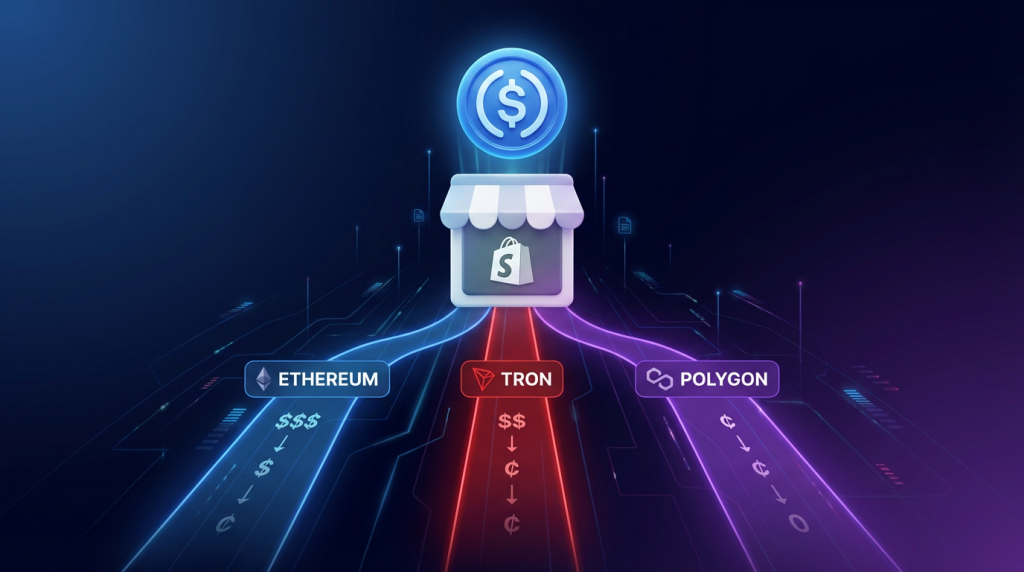
You can accept USDC payments on your Shopify store by installing Aurpay’s native Shopify app and enabling USDC on the networks your customers prefer. Setup takes about 15 minutes, requires no KYC, and sends USDC directly to your wallet — giving you dollar-pegged stability without the 2.9% credit card processing fee.
USDC (USD Coin) is the second-largest stablecoin by market cap, backed 1:1 by U.S. dollar reserves held by Circle. Unlike Bitcoin or Ethereum, USDC does not fluctuate in price — one USDC is always worth one dollar. This makes it the most merchant-friendly cryptocurrency: you receive exactly what your customer pays, with no volatility risk between checkout and conversion. But USDC exists on multiple blockchain networks, each with different fees, speeds, and wallet compatibility. Choosing the right network for your Shopify store is the most important decision you will make when setting up USDC payments.
Why USDC Over Other Stablecoins
Regulatory Clarity
Circle, the issuer of USDC, is a U.S.-regulated financial institution that publishes monthly reserve attestations audited by Deloitte. As of Q1 2026, USDC reserves are held in cash and short-term U.S. Treasuries at regulated financial institutions. This transparency matters for merchants concerned about counterparty risk — you are not relying on an opaque offshore entity to maintain the dollar peg.
The GENIUS Act, which advanced through the U.S. Senate in early 2026, establishes a federal framework for stablecoin issuers. USDC is widely expected to be among the first compliant stablecoins under this legislation. For merchants who want to accept stablecoins without regulatory uncertainty, USDC offers the clearest path. Our GENIUS Act compliance guide covers the regulatory landscape in detail.
USDC vs. USDT for Merchants
USDT (Tether) has a larger market cap and higher trading volume than USDC, but the two stablecoins serve different merchant needs. USDT dominates in Asian and emerging markets, where Tron (TRC-20) network usage is highest. USDC has stronger adoption in North American and European markets, and deeper integration with institutional DeFi protocols.
For Shopify merchants, the practical question is which stablecoin your customers hold. If you sell to a global audience, accept both. If your primary market is North America or Europe, USDC is likely the more popular choice. If you already accept USDT, adding USDC takes a single toggle in your gateway settings — there is no reason to limit your options. For a deeper comparison, see our USDT vs. USDC merchant guide.
USDC Networks Compared: ERC-20 vs. TRC-20 vs. Polygon
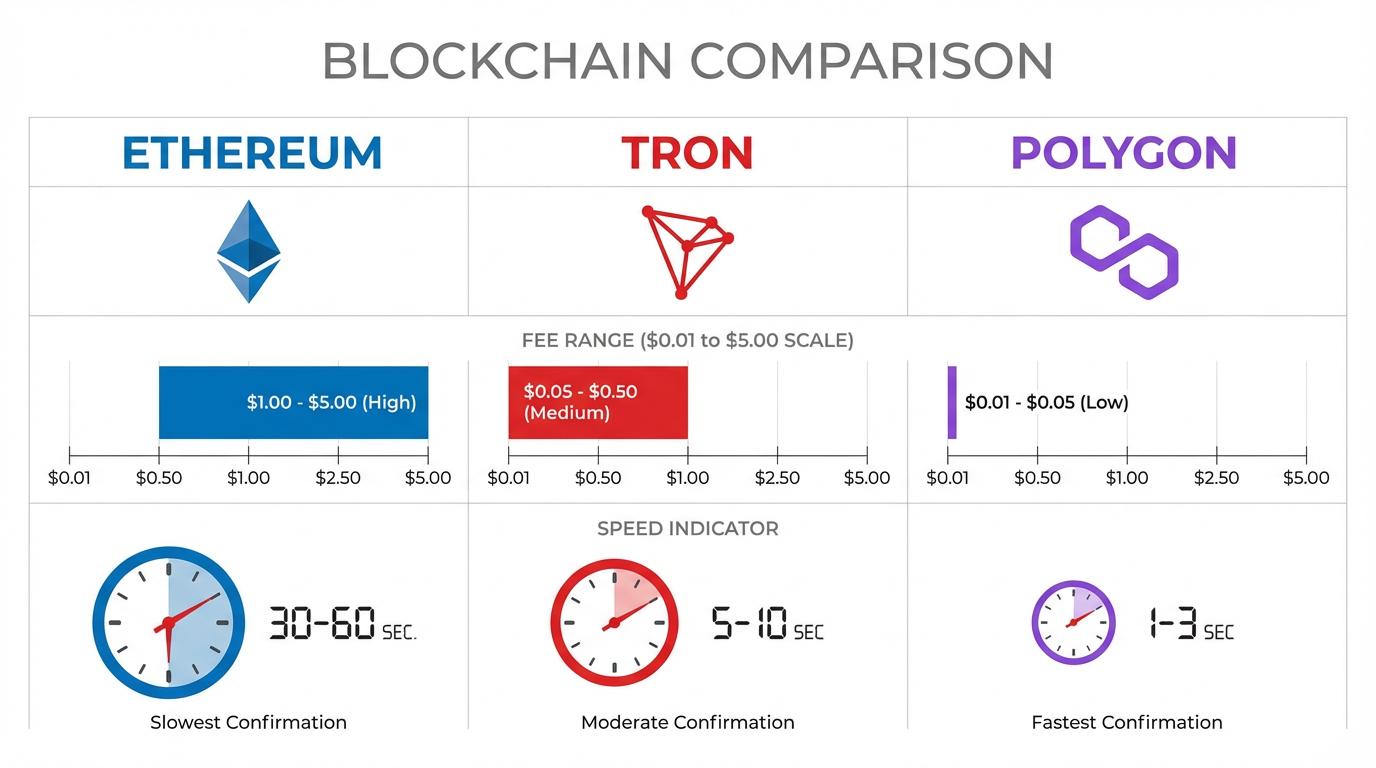
USDC is issued natively on multiple blockchain networks. Each network carries different transaction fees, confirmation speeds, and wallet support. Understanding these differences is critical for configuring your Shopify store’s payment options.
ERC-20 (Ethereum Mainnet)
ERC-20 is the original and most widely supported USDC network. Every major wallet, exchange, and DeFi protocol supports USDC on Ethereum. This makes it the safest default — your customers are almost certainly able to send ERC-20 USDC regardless of which wallet they use.
The trade-off is cost. Ethereum mainnet gas fees for a USDC transfer range from $0.50 to $5.00 under normal conditions, and can spike above $15 during congestion. For orders above $100, the fee is negligible. For smaller transactions — digital products, subscriptions under $50, or micro-purchases — ERC-20 fees eat into the cost advantage that crypto payments offer over credit cards.
Best for: High-value orders ($100+), customers who primarily use Ethereum-based wallets, maximum compatibility.
TRC-20 (Tron Network)
USDC on Tron costs a fraction of Ethereum fees. A typical TRC-20 transfer runs $0.10 to $0.50, and confirmations complete in about 3 seconds. Tron is the dominant network for stablecoin transfers globally — it processes more USDT volume than any other chain, and USDC adoption on Tron has grown significantly through 2025 and 2026.
TRC-20 is particularly popular with customers in Asia, the Middle East, and Latin America, where Tron-based stablecoins are widely used for remittances and peer-to-peer payments. If your Shopify store serves these markets, TRC-20 support is essential. The network is supported by most major wallets (TronLink, Trust Wallet, Ledger) and exchanges allow direct TRC-20 withdrawals.
Best for: Global audience, cost-sensitive transactions, customers in emerging markets, orders of any size. See our TRC-20 payment processing guide for more on low-fee stablecoin transactions.
Polygon
Polygon offers Ethereum-level compatibility with fees below $0.01 per transaction. USDC on Polygon is natively issued by Circle (not a bridged token), which means it carries the same backing guarantees as ERC-20 USDC. Confirmation times are roughly 2 seconds.
Polygon has strong adoption among DeFi users and is natively supported by MetaMask, Coinbase Wallet, and most modern wallets. Many exchanges — including Coinbase, Kraken, and Binance — support direct USDC withdrawals to Polygon, so customers can fund their wallets without paying Ethereum bridging fees.
Best for: Low-cost transactions, DeFi-native customers, North American and European markets, stores that also accept ETH payments on Polygon.
Other Supported Networks
Aurpay also supports USDC on Arbitrum and BSC (BEP-20). Arbitrum inherits Ethereum’s security model with fees between $0.01 and $0.25. BSC offers low fees and fast confirmations, popular in the Binance ecosystem. Enabling these alongside the three main networks gives your customers maximum flexibility.
Which Networks Should Your Shopify Store Support?
Enable all available networks. There is no downside to offering more options — the customer chooses which network to send from based on their wallet balance and preference. At minimum, support ERC-20 (universal compatibility) plus one low-fee network (TRC-20 for global reach, or Polygon for Ethereum ecosystem users).
The most common mistake merchants make is enabling only ERC-20. This forces every customer to pay Ethereum gas fees, which discourages small purchases and drives away price-sensitive buyers who hold USDC on cheaper networks.
How to Set Up USDC Payments on Shopify
Step 1: Install the Aurpay App
Search for Aurpay in the Shopify App Store and install it. The app integrates with your Shopify checkout natively — no theme modifications, no custom code, and no third-party scripts. Installation adds a crypto payment option alongside your existing payment methods.
Step 2: Connect Your Wallet
Enter your wallet address in the Aurpay dashboard. Because Aurpay is non-custodial, USDC payments go directly to this address. You can use any wallet that supports the networks you want to accept — MetaMask, Ledger, Trust Wallet, or a dedicated business wallet.
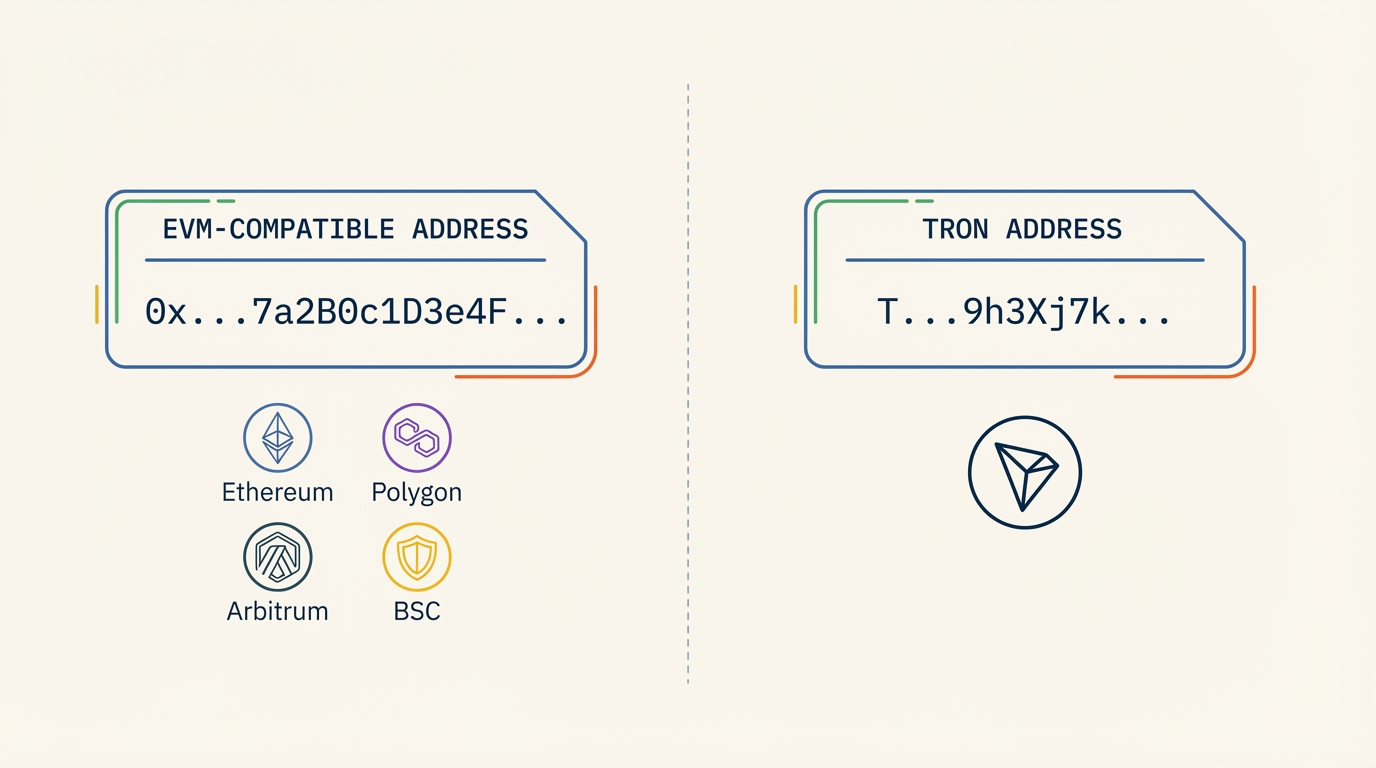
One important detail: make sure your wallet address supports all the networks you plan to enable. EVM-compatible networks (Ethereum, Polygon, Arbitrum, BSC) share the same address format, so a single Ethereum address works across all four. TRC-20 (Tron) uses a different address format starting with “T” — you will need to provide a separate Tron wallet address to accept TRC-20 USDC.
Step 3: Enable USDC and Select Networks
In the Aurpay settings panel, enable USDC as an accepted currency and toggle on the networks you want to support. You can also enable other cryptocurrencies — USDT, BTC, ETH, DAI — at the same time. Each currency and network combination is independently configurable.
Step 4: Configure Display Settings
Customize how the crypto payment option appears at checkout. Use a clear label like “Pay with USDC or Crypto” so customers immediately see the option. The payment page automatically displays the correct USDC amount, wallet address, and QR code for each supported network.
Step 5: Test a Payment
Place a test order and select the crypto payment method. Verify that the checkout shows the correct USDC amount and network options. Send a small USDC payment on one of your enabled networks and confirm it arrives in your wallet. If you enabled multiple networks, test at least one EVM network and TRC-20 separately to verify both wallet addresses are configured correctly.
Fees and Settlement: What You Actually Pay
Understanding the full cost structure of USDC payments helps you compare accurately against credit card processing.
Gateway Fee
Aurpay charges 0.8% per transaction. On a $100 USDC payment, that is $0.80. There is no monthly subscription, no setup fee, and no minimum transaction volume. Compare this to Shopify Payments (2.4% to 2.9% plus $0.30) or PayPal (2.9% plus $0.30), and the savings are clear — especially on larger orders where the percentage difference compounds.
Network Fee
The customer pays the blockchain network fee when sending USDC. This cost varies by network:
- ERC-20: $0.50 to $5.00 (varies with Ethereum gas prices)
- TRC-20: $0.10 to $0.50
- Polygon: Less than $0.01
- Arbitrum: $0.01 to $0.25
- BSC: $0.01 to $0.10
Because the network fee is paid by the sender, your effective cost as a merchant is the 0.8% gateway fee alone. This is one of the clearest advantages of crypto payments — the processing cost is transparent and predictable, with no hidden interchange fees, assessment fees, or cross-border surcharges.
No Conversion Spread
Since USDC is dollar-pegged, there is no currency conversion between what the customer pays and what you receive. You receive USDC, which is redeemable 1:1 for USD through Circle directly or through any major exchange. This eliminates the FX conversion spreads that custodial gateways often hide in their “free conversion” pricing.
When to Convert USDC to Fiat
Unlike volatile cryptocurrencies, USDC does not require urgent conversion to protect against price drops. One USDC equals one dollar whether you hold it for an hour or a month. This gives you flexibility in managing your cash flow.
Immediate conversion: Transfer USDC to an exchange (Coinbase, Kraken) and redeem for USD. Settlement to your bank account typically takes 1 to 3 business days. Best for merchants who need fiat for supplier payments or operating expenses.
Hold as USDC: Keep received payments in USDC and use them directly for business expenses paid in crypto, or earn yield through regulated DeFi protocols. An increasing number of suppliers, contractors, and SaaS platforms accept USDC directly, eliminating the fiat conversion step entirely.
Hybrid approach: Convert what you need for operational expenses and hold the rest in USDC. This is the most common strategy among Shopify merchants who accept stablecoins regularly.
USDC Payment Analytics and Reconciliation
Every USDC transaction is recorded on the blockchain with a unique transaction hash. This provides an immutable record of every payment — amount, timestamp, sender address, and network. For accounting purposes, USDC simplifies crypto bookkeeping significantly compared to Bitcoin or Ethereum, because there is no price fluctuation to track between receipt and conversion.
Your WooCommerce or Shopify order records, combined with the blockchain transaction data, create a complete audit trail. Export your wallet’s transaction history and match it against your store’s order IDs for clean reconciliation. Crypto accounting tools like CoinTracker or Koinly can automate this process.
Common Setup Mistakes
Enabling only ERC-20. This is the most expensive USDC network for your customers. Always enable at least one low-fee alternative (TRC-20, Polygon, or both) to avoid losing cost-sensitive buyers.
Using the wrong wallet address for Tron. EVM networks (Ethereum, Polygon, Arbitrum, BSC) share the same address format. Tron uses a different format. Double-check that you have entered the correct Tron wallet address (starts with “T”) in the TRC-20 configuration. Sending USDC to the wrong address type results in lost funds.
Not testing each network. After setup, send a small test payment on each enabled network to verify everything works. A misconfigured wallet address on one network will not cause an error on other networks — you will only discover the problem when a customer tries to pay on that specific chain.
Hiding the crypto payment option. Place the crypto payment method prominently at checkout. Shopify merchants who display crypto alongside Shopify Payments and PayPal report 3% to 8% of total orders shifting to crypto, depending on their customer demographic.
Start Accepting USDC on Shopify Today
USDC gives your Shopify store the cost savings of crypto payments without the volatility risk of Bitcoin or Ethereum. Multi-network support means your customers can pay on whichever chain they prefer — ERC-20 for maximum compatibility, TRC-20 for low fees, Polygon for near-zero cost. You receive dollar-pegged value directly in your wallet, with full control and no custody risk.
Aurpay’s native Shopify app supports USDC across all major networks alongside BTC, ETH, USDT, and 10+ other cryptocurrencies. Processing fee is 0.8% per transaction with no KYC, no monthly fees, and no lock-up period. Install the Aurpay Shopify app and start accepting USDC payments in 15 minutes.

