
Hermes Agent Security Risks: 6 Threats to Know
 Aurpaytech
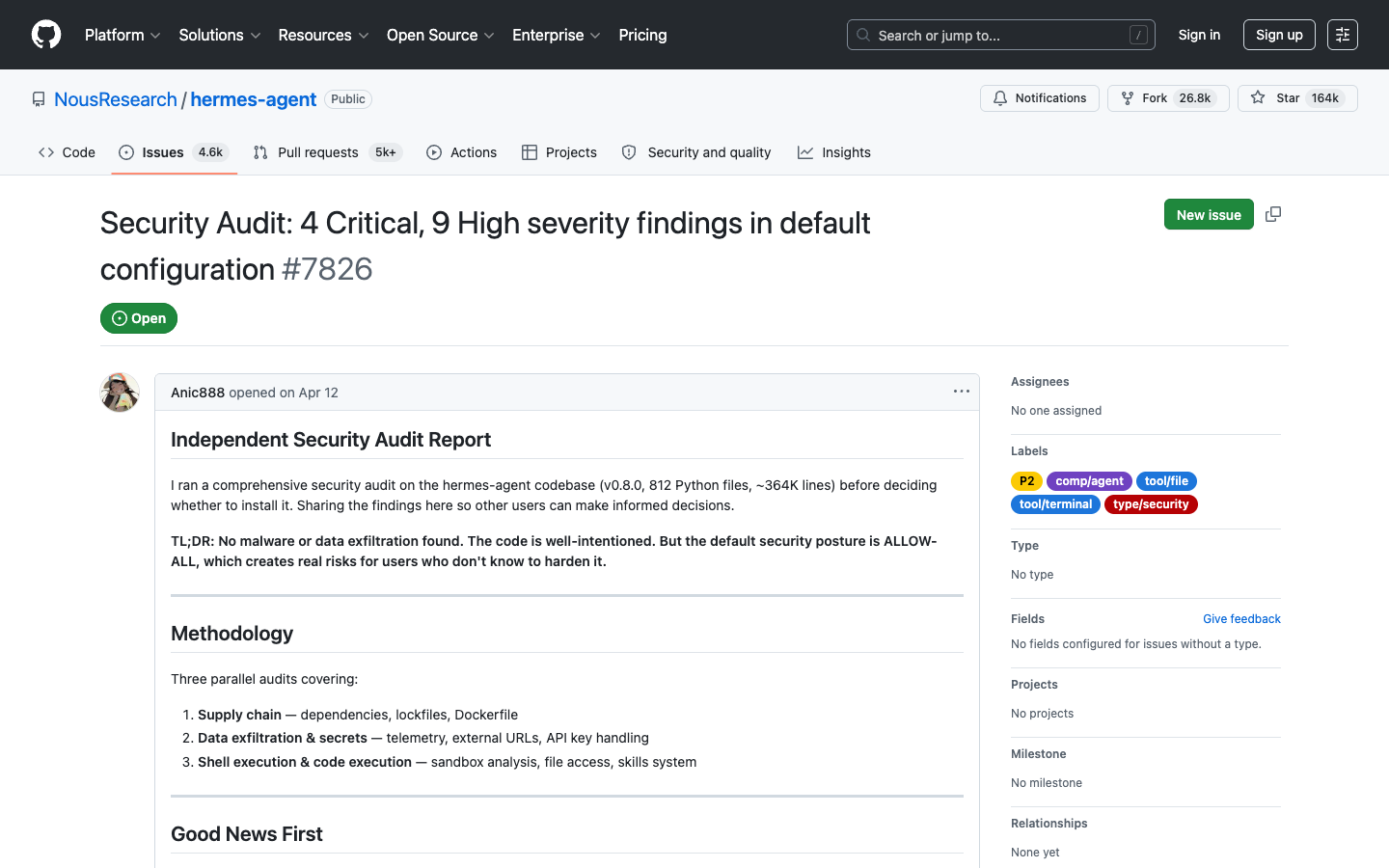
Four critical vulnerabilities. Nine high-severity findings. Zero known wild exploits as of the April 2026 independent audit of Hermes Agent v0.8.0. That last number is the only reassuring one. Auditor Anic888 reviewed 812 Python files and roughly 364,000 lines of code and found no malware, no backdoors, and no telemetry. What they did find was a set of architectural decisions that create serious exposure for anyone using Hermes to automate tasks involving credentials, file systems, or crypto funds. This guide breaks down each finding with the relevant evidence and tells you exactly what to change before you deploy.
If you want the broader picture of what Hermes Agent is and how its self-improving skill system works, start with our complete guide to Hermes Agent. If you are evaluating Hermes against OpenClaw for crypto workflows, see our Hermes vs OpenClaw comparison. This article focuses exclusively on the security side.
1. Unrestricted shell execution: the agent that can run anything
The most severe finding in the v0.8.0 audit is straightforward: Hermes’s terminal tool passes arbitrary commands directly to bash -c via subprocess when running on the default local backend. There are no syscall-level restrictions, no allowlist of permitted commands, and no sandbox preventing the agent from executing commands that affect the whole system.
In practice, this means if you ask Hermes to help you manage crypto wallets, analyze trading data, or process invoices, the underlying LLM has unrestricted shell access to your machine. That access does not disappear when the task is crypto-adjacent. If a context file contains a crafted instruction (a malformed AGENTS.md, a compromised project directory, a poisoned git repo), the agent can be nudged toward running commands you never authorized.
The official security model does include a hardline blocklist of catastrophic commands: rm -rf /, fork bombs, raw disk writes. These are blocked even in YOLO mode. But the blocklist is narrow by design. It stops obvious disasters. It does not stop targeted credential theft, staged exfiltration, or lateral movement commands that look like normal development work.
How to protect yourself
- Never run Hermes on your primary workstation for high-stakes tasks. Use a dedicated machine, container, or VM where the blast radius is bounded.
- Run in Docker mode when possible. The Docker backend drops all Linux capabilities (
--cap-drop ALL), enforces--security-opt no-new-privileges, and caps processes at 256 via--pids-limit. This meaningfully limits what a rogue shell command can reach. (Note: see Section 3 on the approval bypass caveat.) - Keep
approvals.mode: manual. This is the default. Do not change it to Smart or Off for sessions involving credentials or financial data. - Audit context files before starting a session. Every
AGENTS.mdandSOUL.mdin your working directory is loaded and scanned. Hermes does scan for hidden instructions and invisible Unicode — but scanning is not the same as blocking.
2. Full filesystem read access: every secret on your machine is in scope
The read_file tool in Hermes has no deny list. The audit confirmed it can read /etc/passwd, SSH private keys in ~/.ssh/, .env files, credential stores, and any other file the running user has permission to access. There is no configuration option to restrict read access to a specific working directory.
For a general-purpose coding agent, this design makes sense — you need to read any file to do useful work. For an agent handling crypto-adjacent tasks, it creates an uncomfortable situation. Your ~/.hermes/.env file stores LLM API keys. If you have stored exchange API keys, wallet seed phrases, or private keys in any file your user account can access, Hermes can read them. The question is whether anything else it encounters can cause it to act on that data.
The audit flagged this as Critical because the read scope includes files most users would not expect an AI agent to touch: SSH keys that grant server access, .aws/credentials that control cloud infrastructure, browser profiles that hold saved passwords. An agent operating with good intent should not need any of these. If a prompt injection vector is present (in a repository, a third-party skill, or a crafted task description), the agent has the read access to retrieve and relay them.
How to protect yourself
- Run Hermes as a restricted user. Create a dedicated system user for your Hermes sessions. Mount only the directories it needs. Keep your primary credentials outside that user’s home directory.
- Move sensitive files out of reach. SSH keys, wallet files, and exchange credentials should live in directories that Hermes’s user account cannot read. On Linux,
chmod 700and group ownership control this cleanly. - Keep credentials out of any path the agent can read. Hermes redacts some credential patterns in its error output, but that is not access control. Store exchange and wallet secrets in a separate, permission-restricted location outside the agent’s working directories.
- Separate Hermes sessions by risk level. Use one session for general coding tasks, a different isolated environment for anything touching financial systems.
3. Container approval bypass: Docker does not mean safe
This is the finding that most directly contradicts the intuitive expectation that containerizing an agent makes it safer. The audit confirmed that when Hermes runs on Docker, Singularity, Modal, or Daytona backends, all approval checks are unconditionally skipped.
The Manual approval mode, which prompts you before dangerous commands run, does not function in containerized environments. The apparent logic is that container isolation is sufficient protection, so per-command human review is unnecessary. The audit rated this Critical because that reasoning breaks down the moment you mount external volumes, forward environment variables, or allow network access — which almost all real container deployments do.
If you run Hermes in Docker with your API keys passed via environment variables (a common deployment pattern) and your project directory mounted as a volume, container mode gives you less oversight, not more. Commands run without prompts. The container limits syscalls and privileges, but it does not limit what the agent does with the access it legitimately has.
How to protect yourself
- Treat container mode as compute isolation, not trust isolation. You still need to limit what the agent can access within the container.
- Minimize volume mounts. Mount only the specific project directory the agent needs, read-only where possible. Do not mount your home directory.
- Be selective with environment variable forwarding. Use Docker’s
--envflag to pass only the specific variables Hermes needs. Theforward_envconfiguration can silently expose more of your environment than intended. - Layer your defenses. Container isolation plus restricted filesystem mounts plus minimal environment variables gives meaningful protection even without per-command approval prompts.
4. Persistent skills as a prompt injection vector
Hermes’s self-improvement mechanism works by writing Markdown skill files to ~/.hermes/skills/ after completing complex tasks. These skill files are loaded automatically in subsequent sessions and interpreted as instructions. That is the feature that makes Hermes genuinely novel, and it is also the attack surface the audit rated as Critical.
Once a skill file is written to that directory, it functions as a persistent prompt injection vector. Every future session loads it, and the agent treats its contents as guidance. The only protection is regex-based filtering, which the audit explicitly called insufficient for sophisticated injections. An attacker who can influence what gets written to ~/.hermes/skills/ (through a malicious repository, a crafted task, or a compromised context file) can embed instructions that survive across sessions and affect future behavior.
This differs from the supply-chain risk in the OpenClaw/ClawHub ecosystem, where users install third-party skills from a public marketplace. In Hermes, the agent generates its own skills. The risk is subtler: if the agent is manipulated during a session, it can write a skill that shapes all future sessions. The persistence mechanism that makes Hermes useful is the same one that makes a successful injection durable.
How to protect yourself
- Audit
~/.hermes/skills/regularly. Review the contents of skill files the agent has generated. Look for instructions that seem out of scope for the original task, references to external URLs, or anything that instructs the agent to handle credentials differently. - Delete skills from untrusted sessions. If you ran a Hermes session on an external codebase, a third-party repository, or any context you do not fully control, review and selectively remove the generated skills.
- Do not run the agent in repositories you do not own without sandboxing. The context files in those repositories become instruction sources. Combined with persistent skill generation, a single compromised session can have long-tail effects.
- Consider the skill directory immutable for production deployments. If you are running Hermes in an automated pipeline, disable skill writing or mount
~/.hermes/skills/as a read-only volume.
5. YOLO mode and plaintext API keys
Two High-severity findings from the audit belong together. Both represent the same failure mode: convenience shipped as a default.
YOLO mode is enabled by setting HERMES_YOLO_MODE=1 or by setting approvals.mode: off in configuration. It disables all security checks for terminal commands. The official documentation warns to “only use this in trusted, sandboxed environments.” The setting is still one line in a config file, with no friction to enable it and nothing preventing it from being applied to a session that has access to real credentials and funds.
Plaintext API key storage means that ~/.hermes/.env, which holds your LLM provider keys and any other secrets you have configured, is an unencrypted flat file. There is no OS keychain integration, no file-level encryption, and no access control enforced by Hermes itself. Hermes redacts some credential patterns in its error output, but that does nothing to protect the storage file. Anyone with read access to your home directory (a compromised process, another user on a shared system, or the agent itself) can read your keys in full.
For crypto users, the implications compound. Exchange API keys with withdrawal permissions stored in a plaintext .env file, accessible by an agent running in YOLO mode, represent a risk profile most users would not knowingly accept.
How to protect yourself
- Never enable YOLO mode for sessions involving financial APIs. The performance gain from skipping approval prompts is not worth the elimination of the last human checkpoint before execution.
- Restrict file permissions on
~/.hermes/.env. Runchmod 600 ~/.hermes/.envimmediately after setup. This limits read access to your user account only and prevents other processes on the system from reading your credentials. - Use read-only API keys wherever the workflow permits. If a Hermes session only needs to fetch market data or read blockchain state, configure your exchange and provider keys to be read-only. A key that cannot execute trades or withdrawals is worth far less to an attacker.
- Rotate keys after sessions on untrusted machines. If you run Hermes on any machine where you do not control all running processes, treat your API keys as potentially exposed afterward.
6. The autonomous finance gap: no authorization controls for self-directed transactions
This risk does not come from the audit. It comes from the absence of something in the official security documentation. Hermes has well-documented controls for shell commands: three approval modes, a hardline blocklist, container isolation. For financial operations, there are none.
The official security docs cover command execution, filesystem access, network requests, MCP subprocess isolation, and SSRF protection. They do not mention transaction authorization limits, spending caps, approval requirements for wallet operations, or any mechanism that specifically gates autonomous financial actions. The gap exists not because someone identified it as a vulnerability, but because the feature simply does not exist.
This matters in practice because Hermes’s general-purpose shell access, combined with crypto-capable tools you can install or build, creates an environment where the agent can execute financial operations without any of the controls that govern its command execution. You can configure Hermes to pause before running a shell command. No equivalent configuration exists for pausing before signing a blockchain transaction.
The OpenClaw ecosystem (built explicitly for crypto trading automation) has the same gap, which our OpenClaw security guide covers in depth. General-purpose AI agents were not designed with financial authorization models in mind, and neither Hermes nor its peers have retrofitted them.
How to protect yourself
- Never give Hermes access to a wallet with significant balances. If you are testing crypto automation with Hermes, use a dedicated wallet funded only with what you are willing to lose in a misconfigured execution.
- Implement your own approval layer. If you build a crypto workflow on top of Hermes, add a confirmation step at the application level before any transaction is signed or broadcast. The agent should prepare and propose transactions; you should sign them.
- Use hardware wallets for signing. Even if the agent constructs a transaction correctly, routing the final signature through a hardware wallet adds a physical confirmation step that no software configuration can bypass.
- Keep trading wallets separate from operational wallets. The wallet Hermes has access to should hold only what is needed for active operations — not your long-term holdings, not your business treasury.

Hermes vs OpenClaw: the skill supply-chain contrast
Security researchers have studied these two platforms from different angles. The comparison is useful even though the attack surfaces are not identical.
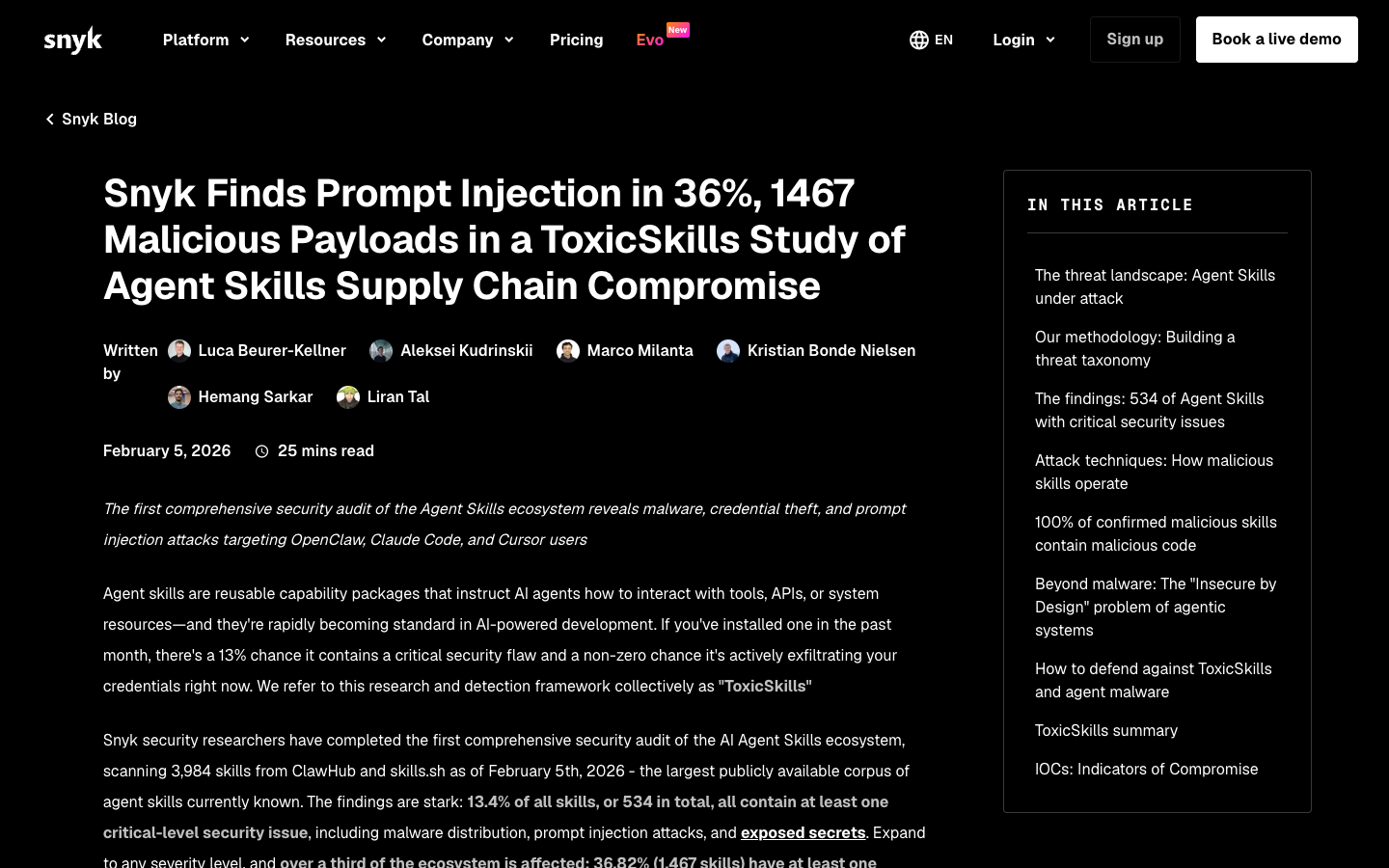
OpenClaw faces a documented supply-chain problem at scale. Snyk’s ToxicSkills study (February 5, 2026) scanned 3,984 skills from the ClawHub marketplace and skills.sh and found that 36.82% — 1,467 skills — contained at least one security flaw. Of those, 13.4% (534 skills) contained critical-level vulnerabilities. Snyk identified 76 confirmed malicious payloads, with 91% of those malicious skills combining prompt injection with traditional malware. Hardcoded credentials appeared in 10.9% of all scanned skills. The mechanism is straightforward: a third-party marketplace with low barriers to publish and high user demand creates an ideal distribution channel for malicious code.
Important note: the ToxicSkills data is specific to the OpenClaw/ClawHub ecosystem. Hermes does not have a public third-party skill marketplace of comparable scale, and no equivalent study exists for Hermes skills.
Hermes faces a different but structurally related risk. Its skills are agent-generated rather than third-party-published, which eliminates the supply-chain distribution problem. An attacker cannot submit a malicious skill to a Hermes marketplace because there is no Hermes marketplace. What Hermes has instead is the persistent skill injection vector described in Section 4: skills the agent writes itself, based on the instructions and context it encounters. The attack surface shifts from “what users install” to “what the agent is manipulated into writing.” Both are prompt injection vectors, but one is external and mass-distributed while the other is internal and session-specific.
For users evaluating which platform to trust with crypto-sensitive workflows, the risk profiles differ in kind, not just in scale. OpenClaw’s risk is concentrated at install time, in skill selection and verification. Hermes’s risk is concentrated throughout runtime, in context integrity and session isolation. Neither framework has solved the autonomous-finance authorization problem.
For a direct feature-by-feature comparison beyond security, see our Hermes vs OpenClaw guide.
The Hermes security checklist
Every finding above comes from verified sources: the April 2026 independent audit of v0.8.0, the official Hermes security documentation, and the ToxicSkills research on the broader AI agent skill ecosystem. Below is a consolidated checklist by role.
For all users
- Keep
approvals.mode: manual— never set to Off for sessions involving credentials or financial tools - Run
chmod 600 ~/.hermes/.envimmediately after setup - Store exchange and wallet credentials outside any directory the agent can read
- Use read-only API keys for any task that only needs to read data
- Audit
~/.hermes/skills/after any session involving external repositories or third-party context - Never run YOLO mode (
HERMES_YOLO_MODE=1) on machines with crypto credentials or financial API access - Rotate API keys after running sessions on machines you do not fully control
- For any crypto workflow, use a dedicated wallet with only what is needed for that session
For developers and operators
- Run Hermes as a restricted system user with a bounded home directory, not as your primary user
- In Docker deployments, mount only required directories — read-only where possible — and never mount your full home directory
- Pass environment variables to containers explicitly with
--env KEY=value, not viaforward_envwildcards - Treat container isolation as compute isolation only — layer it with access controls, not as a substitute for them
- In automated pipelines, mount
~/.hermes/skills/as read-only to prevent skill injection from persisting - Add an application-level authorization step before any transaction signing in crypto workflows — do not rely on Hermes’s built-in approval flow for financial operations, as none exists
- Review all context files (
AGENTS.md,SOUL.md,.cursorrules) in project directories before running sessions - For shared infrastructure deployments, audit generated skills on a regular schedule
The custody question at the payment layer
The six risks above address what happens when the agent itself is the vulnerability. There is a seventh risk at the infrastructure layer: what happens to funds in transit when the payment system holding them is custodial.
When an AI agent automates merchant workflows (generating invoices, triggering payment requests, processing settlements), it interacts with your payment infrastructure. If that infrastructure is custodial, your funds pass through a third-party system before reaching you. The agent’s security posture becomes entangled with the gateway’s security posture. A compromised agent, a misconfigured API key, a session running without approval prompts — any of these can interact with a system that holds your business funds.
Non-custodial payment architecture severs that dependency. When payments settle directly into a merchant-controlled wallet at confirmation, with no intermediary holding funds and no API key that grants withdrawal access to a third-party balance, the attack surface shrinks. A compromised agent can read your payment data. It cannot access funds already sitting in your own wallet.
That is the structural argument for Aurpay: a non-custodial crypto payment gateway where merchants retain full custody from the first confirmation. At 0.8% per transaction with instant settlement and no bank account required, it is designed for the kind of lean, automated merchant stack that AI agents like Hermes are built to support. The agent handles the workflow. The custody model means that even a worst-case agent security incident does not expose your business treasury. Explore Aurpay’s non-custodial gateway and see how it fits alongside your automation tooling.